Whydah-OAuth2Service
An Whydah module to offer OAuth2 provider compatibility And OpenID Connect for Whydah installations
| Field | Value |
|---|---|
| GitHub | https://github.com/Cantara/Whydah-OAuth2Service |
| Language | Java |
| Stars | 3 |
| Last updated | 2026-03-14 |
| Homepage | https://wiki.cantara.no/display/whydah/OAuth2Service |
| Topics | oauth2-provider sso sso-solution whydah |
Related Wiki Pages
This project has documentation in the Cantara Wiki. See the WHYDAH section.
README
Whydah-OAuth2Service




The Whydah-OAuth2Service is an OAUTH2 and OpenID Connect provider-proxy for Whydah (STS) which supply oauth2 and OpenID Connect compatible APIs and tokens for easy simplified integration with OAUTH2 applications. The Whydah-OAuth2Service uses Whydah-SecurityTokenService as backend by mapping applicationtokenid's to OAUTH2 authorozation_codes by using the Whydah SDK Hystrix commands..
How OAuth 2 Works
If you're just starting out with OAuth2, you might find these resources useful:
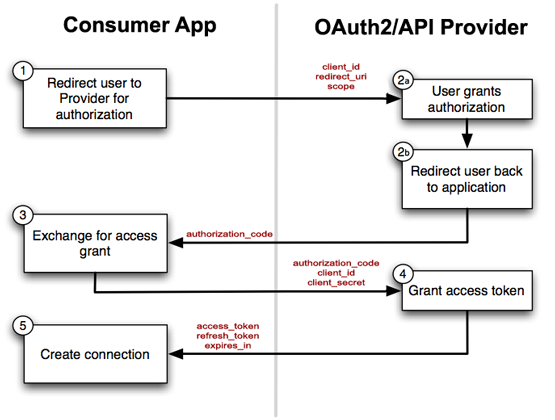
This module in in early development state as we speak.
Terminology mapping
| OAuth2 term | Whydah term | Comment |
|---|---|---|
| client | application | |
| client_id | --applicationID-- | symmetric and padded mapping in module based on module configuration |
| client_secret | applicationSecret | |
| access_token | applicationToken or userToken |
Quick build and verify * mvn clean install * java -jar target/Whydah-OAuth2Service-0.4-SNAPSHOT.jar * wget http://localhost:8086/Whydah-OAuth2Service/health * curl -v http://localhost:8086/Whydah-OAuth2Service/authorize?response_type=code&client_id=CLIENT_ID * wget "http://localhost:8086/Whydah-OAuth2Service/token?grant_type=client_credentials&grant_type=client_credentials&client_id=CLIENT_ID&client_secret=CLIENT_SECRET" * curl -X POST "http://localhost:8086/Whydah-OAuth2Service/token?grant_type=client_credentials&grant_type=client_credentials&client_id=CLIENT_ID&client_secret=CLIENT_SECRET" * curl -X POST "http://localhost:8086/Whydah-OAuth2Service/token?grant_type=authorization_code&code=mycode&redirect_uri=http://ocalhost:8086/Whydah-OAuth2Service/oauth2&client_id=CLIENT_ID&client_secret=CLIENT_SECRET"
Verify token * curl -i -H "Authorization: Bearer AsT5OjbzRn430zqMLgV3Ia" http://localhost:8086/Whydah-OAuth2Service/verify
Access OAuth2 protected demo service * curl -i -H "Authorization: Bearer AsT5OjbzRn430zqMLgV3Ia" http://localhost:8086/Whydah-OAuth2Service/ping
Configuration
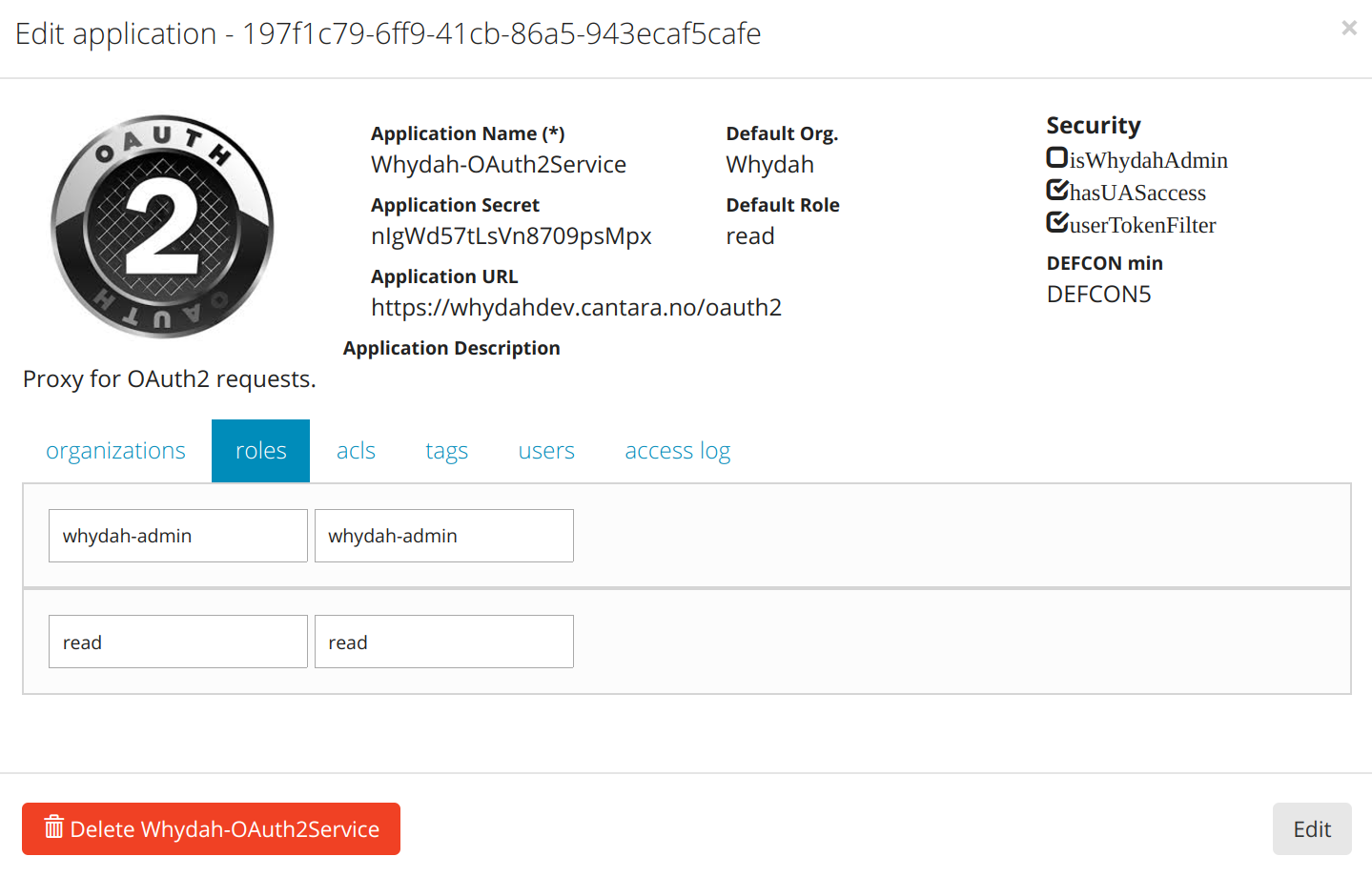
OAUTH2 redirect configuration
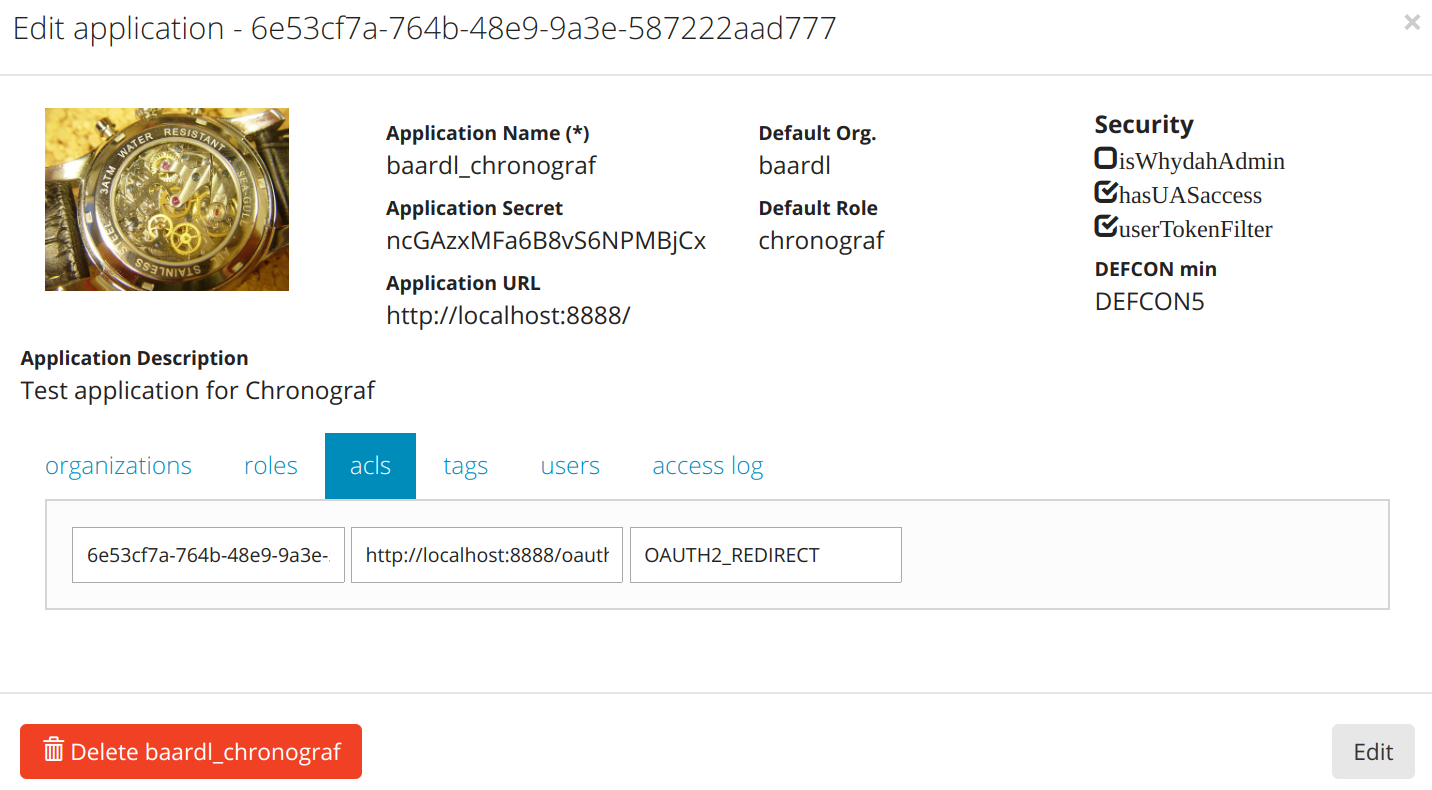
JWT Roles configuration
Whydah can optionally include user-roles as claims in the JWT. This is configured per scope using "App tags" of the application representing the relevant client.
In order to configure roles to be included as claims in the JWT for a given scope, define a tag starting with the prefix
jwtroles- and ending with the scope that the tag should apply to, e.g. openid. Note that the jwtroles- prefix
defined in the tag-name is case-insensitive, and that scope is always treated as lowercase. The tag-value is a ;
(semicolon) separated list of user-role-name patterns that should be includes as claims in that user's JWT. The patterns
are used as either a literal (exact-match), or as a literal ending with a * wildcard (prefix-match).
Example
For the scope openid, allow user-roles foo, bar, and all roles starting with a.
Application MyApp is configured with the following tag:
* tag-name: JWTROLES-OPENID
* tag-value: foo;bar;a*
User me is configured with the following roles:
* MyApp, foo, value-of-foo
* MyApp, bar, value-of-bar
* MyApp, zig, value-of-zig
* MyApp, abc, value-of-abc
* MyApp, ax, value-of-ax
* MyApp, bx, value-of-bx
The resulting JWT payload for the client of MyApp and user me would contain the following role claims.
(Notice that roles zig and bx are not included):
{
  ...
  "role_foo": "value-of-foo",
  "role_bar": "value-of-bar",
  "role_abc": "value-of-abc",
  "role_ax": "value-of-ax",
  ...
}
Logout
We support RP-Initiated Logout 1.0 for OpenIDConnect as of now but we still keep compatibility with OAuth2 scheme
We can use POST or GET to send the end-user to log out of the OpenID provider. If using the HTTP GET method, the request parameters are serialized using URI Query String Serialization. If using the HTTP POST method, the request parameters are serialized using Form Serialization.
Parameters:
-
[ client_id ] OPTIONAL - for OAuth2 compatibility. Skip this if you use openid scope
-
[ logout_uri ] OPTIONAL - for OAuth2 compatibility. Skip this if you use openid scope
-
[ id_token_hint ] - for OpenIDConnect - Previously issued ID token to be used as hint about the end-user's current authenticated session with the client. Use of this parameter is recommended.
-
[ post_logout_redirect_uri ] - for OpenIDConnect - URL to which the browser should be redirected after the logout dialog. If an ID token hint is not included in the logout request the redirection parameter will be ignored.
-
[ state ] Optional state to append to the post logout redirection URL.
Success:
Code: 200

Content-Type: text/html

Body: A confirmation dialog whether the end-user agrees to log out of the OpenID provider.
After the confirmation, the user will also be redirected to "post_logout_redirect_uri" with an optional state (if any specified) and canceled=true (in case the user has canceled the logout process) as the query string.
Errors:
500 Internal Server Error - when id_token_hint is invalid
- Example simple logout request:
GET /oauth2/logout HTTP/1.1
Host: entrasso-devtest.entraos.io
GET /oauth2/logout?id_token_hint=eyJraWQiOiJhb2N0IiwiYWxnIjoiUlMyNTYifQ... HTTP/1.1
Host: entrasso-devtest.entraos.io